QuickBooks Payroll: Service, Setup, Pricing and Support Guide
QuickBooks Payroll helps businesses manage employee payments, tax calculations, and other payroll-related tasks. It is available in both QuickBooks Online Payroll and QuickBooks Desktop Payroll, including Enhanced and Enterprise payroll options. In this post, we cover payroll setup, pricing plans, and how to connect QuickBooks payroll customer service for instant help. Whether you are a small business or an enterprise user, QuickBooks Payroll helps streamline payroll processing, reduce manual work, and ensure accurate tax filing through automated tools and expert support services.
What is QuickBooks Payroll?
QuickBooks Payroll is an automated payroll and workforce management software that integrates with QuickBooks. This software automatically calculates wages, processes direct deposit, and manages federal and state tax filings.
The key benefits of using QuickBooks Payroll are as follows:
1. Automated Taxes-
QuickBooks Payroll automatically calculates payroll, files, and pays your taxes before the tax deadlines without any errors.
2. Direct Deposit-
It offers same-day or next-day direct deposit to employees’ bank accounts.
3. Time & Workforce Management-
Payroll also includes features for tracking hours, paying independent contractors, and calculating job costs.
4. Employee Portal (QuickBooks Workforce)
You can also access the QuickBooks Workforce portal, which allows your team to view pay stubs, access W-2s, and handle their own direct deposit information online.
5. HR Tools-
Businesses can also use higher-tier plans that include access to HR support, compliance tracking, and certified HR advisors.
How to Get Started With QuickBooks Desktop Payroll Enhanced?
For setting up QuickBooks Desktop Payroll Enhanced, you need to complete a few tasks to get started.
Step 1: Activate your payroll subscription
After purchasing the QuickBooks Desktop Payroll Enhanced subscription, you have to activate it. The steps for activation depend on whether you purchased the product online, by phone, or through a retail store.
Case 1: If purchased online or by phone
If you have purchased your payroll online or by phone, you’ll get a 16-digit service key through email. You have to provide this service key in QuickBooks to access the payroll features accurately.
If you can’t get your service key, look for it in your spam or junk folders, or use an automated Service key retrieval tool. Besides this, you need to log in using your Intuit account credentials.
- Initially, access your QuickBooks Desktop company file.
- Choose Employees > Payroll > Enter Payroll Service Key > Add.
- After this, mention your service key.
- Click Next, then select the Finish option.
- Now, wait for some time to download the new tax table.
Case 2: If purchased from a retail store
- First, access your QuickBooks Desktop company file.
- Navigate to Employees > Payroll > Install Payroll from Inbox.
- Next, provide the Payroll License and Product Information on the Payroll Activation Page. You can obtain the license and product details from a yellow sticker on the CD folder inside your box.
- Click the Continue option.
- Finally, go through the on-screen instructions to complete the payroll activation, including mentioning your service key.
Step 2: Complete Your Payroll Tasks
Herein, you need to add your employees, set up your federal and state payroll taxes, and enter any paychecks and tax payments you have already paid during this year.
- Move to the Employees menu and click Payroll Setup.
- Follow the on-screen instructions to add your employees, set up your company payroll items, and taxes. Then, enter your pay history (if applicable).
a. Add Employees
In this section, you have to provide your employee’s info, and you can invite your employees to enter some of their own info via our free QuickBooks Workforce product.
Information you require for each employee:
- Completed Form W-4 and any state equivalent forms if possible
- Hire date
- Birth date
- Pay rate
- Any paycheck deductions such as contributions to insurance, retirement, or wage garnishments.
- Bank account or pay card info for direct deposit (if applicable)
- Sick, vacation, PTO accrual rates and balance (if applicable)
b. Set up company (pay items, deductions, PTO)
You can choose the company from a preset list of pay items, insurance benefits, and retirement deductions, or you can set up customer items. In case you are providing your employees with paid vacation or sick time off, you can also include them.
After setting up your payroll items and time off, use the Assign to employees button to apply the items to multiple employees at once.
c. Set up taxes
Herein, you must add your federal and state payroll tax information. You can also set up your payroll taxes electronically.
Information you require;
- Federal Employer Identification Number (FEIN)
- State Withholding/ Unemployment account numbers: Contact your state agencies to register
- Federal and state deposit frequencies: how often you are required by the IRS and state to pay your taxes.
- State tax rates: Unemployment, surcharges, state disability, paid family leave, etc.
d. Enter pay history
If you have previously paid your employees this year, add those paychecks and any tax payments you have made. This information is included on your employee’s W-2s at the end of the year.
Information you require
- Pay stubs or payroll reports for each of your employees paid this year (including any no longer with your business)
- Tax liability reports, tax payment receipts, or statements
e. Review and finalize
Herein, if you have provided pay history, you also need to enter federal and state tax filing details for closed quarters. As a result, this ensures that your employees’ W-2s are accurate at the end of the year.
How to Run Payroll in QuickBooks Desktop Payroll?
To run scheduled or unscheduled payroll for your employees, or to send an employee their final paycheck, follow these steps.
- Choose Employees, then click Pay Employees.
- After this, pick any one of the following payroll types. If you want to run an unscheduled payroll, skip to step 4.
- Scheduled Payroll
- Unscheduled Payroll
- Termination Check
- Now, pick the appropriate schedule, then click Start Scheduled Payroll.
- Give confirmation for the following information:
- Pay period end date
- Check date
- QuickBooks bank account
- Now, choose the employees that you want to pay.
- Next, add the hours worked. There are 2 ways to do this:
- Manually through the grid
- Automatically, if you are using timesheets
- To view everyone’s paycheck details, select Open Paycheck Detail.
- Choose Save & Next to go to the next employee, or select Save & Close to go back to the Enter Payroll Information window.
- Click Continue.
- Now, go through the Check/Direct Deposit printing options.
- At last, confirm the amounts for each employee, then select Create Paychecks.
Result
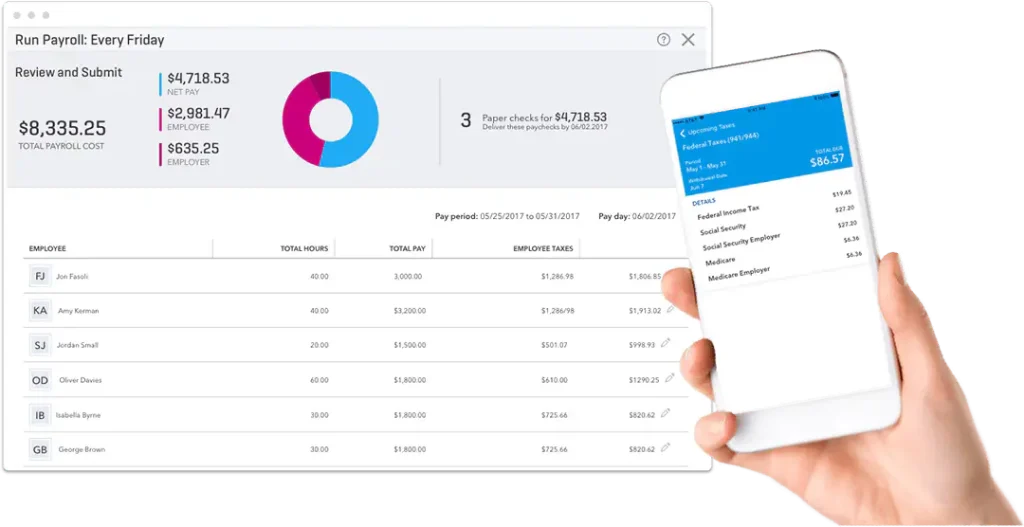
With this, your payroll is submitted for processing. You can now easily access, print, and distribute paychecks and pay stubs.
How to Get Started with QuickBooks Online Payroll?
After signing up for QuickBooks, connect to QuickBooks Online Payroll powered by Employment Hero. Here are a few steps for setting up QuickBooks Online Payroll.
Turn On Payroll
- Go to the left-hand menu and click Payroll.
- Select Choose your plan, then pick the plan that fits your business requirements.
- Fill in your business information.
- Provide your contact details.
- Enter your payroll setup details, including work hours, pay schedule, and industry type.
- Click Sign Up to complete the process.
This will activate your payroll.
Adding an Employee
- Navigate to the left-hand menu and select Payroll.
- Click Add Employees.
- Provide the employee’s personal details and hit Next.
- Mention the Employment Details, such as start date, pay rate, etc, and click Next.
- Input the Bank Details and Account Type for the Employee and click Next.
- Now, provide the Tax File Declaration Information.
- Click Done to complete the process.
Want to get further assistance with adding an employee? Here’s how to set up employee in QuickBooks Payroll.
Set Up Single Touch Payroll
- From the left-hand menu, choose Payroll.
- Choose the Payroll Settings tab and ATO Settings.
- Opt for the Electronic Lodgement & STP tabs.
- Next, contact the ATO on 1300 852 232 and provide them with your Software Provider and Software ID.
Creating & Completing a Pay Run
- From the left-hand menu, choose Payroll.
- Click the New Pay Run option.
- Opt for the Pay Schedule, which determines how often you pay your employees.
- After this, edit the Pay Period Ending and the Date the Pay Run will be paid.
- Choose Create > Pay Run Actions > Add Employees.
- Pick the name of the Employee to expand the Pay Run Details.
- Now, you must include different types of Pay Types (like Allowances, Leave Adjustments, etc) by clicking Action.
- Hit the Finalize Pay Run.
- Choose whether you want to lodge the pay run with the ATO and when to Publish Pay Slips.
- Click Finalize for the confirmation.
How Much is QuickBooks Payroll (Desktop & Online)?
The QuickBooks Payroll pricing depends on whether you opt for QuickBooks Online Payroll or QuickBooks Desktop Payroll. Both of these versions follow a subscription-based model, and pricing depends on features and the number of employees.
QuickBooks Online Payroll Pricing & Features Plans
| Payroll Core | Payroll Premium | Payroll Elite |
| $50–$88/month + per employee fee (~$6.50/employee) | $88–$125/month + per employee fee (~$6.50–$10/employee/month) | $134–$203/month + per employee fee (~$10–$12/employee/month) |
| Features Included: Basic payroll processing Automated payroll calculations Direct deposit W-2 and 1099 support | Features Included: Includes everything in Core Automated tax filing and payments HR support tools Next-day direct deposit Time tracking integration | Features Included: Full-service payroll solution Same-day direct deposit (eligible users) Tax penalty protection (up to limits) Dedicated HR advisor 24/7 expert support |
QuickBooks Desktop Payroll Pricing Plans
The QuickBooks Desktop Payroll is an add-on subscription that is used with QuickBooks Desktop or QuickBooks Enterprise.
1. Core Payroll
- Basic payroll processing tools
- Tax calculation support
- Direct deposit
- Employee paycheck generation
2. Enhanced Payroll
- Automated payroll tax calculations
- Federal and state form generation (941, 940, W-2)
- E-file and e-pay features
- Payroll reporting tools
3. Assisted / Full-Service Payroll
- Intuit manages payroll tax filing and payments
- Compliance handling
- Year-end tax form preparation
- Reduced manual payroll workload
QuickBooks Enterprise Pricing Plans
QuickBooks Enterprise doesn’t include payroll by default.
You can use the Payroll services only as;
- A separate payroll subscription, OR
- A bundled Enhanced or Full-Service Payroll add-on
The pricing plan may vary according to
- Number of employees
- Payroll frequency
- State tax requirements
- Service level selected
How do I contact QuickBooks payroll customer service?
You can contact QuickBooks payroll customer service support through different Intuit support channels. Below are the available methods to get the right assistance for all your queries.
QuickBooks Online Payroll Support
- Initially, sign in to your QuickBooks Online account.
- After this, click (?) Help menu.
- Choose any of the following options to contact QuickBooks Payroll customer service.
- Assistant tab- Enter your query in the “Type or ask something” field, and QuickBooks Assistant will suggest relevant answers or options. If you want to speak with a support expert, simply type “Talk to an expert.”
- Search tab- Alternatively, use the Search tab by entering keywords or your question in the “Search questions, keywords, or topics” field to view helpful articles. If you still need assistance, select “Contact Us” to connect with a product expert.
QuickBooks Desktop Payroll Support
- Open QuickBooks Desktop, then click the Help menu and choose QuickBooks Desktop Help / Contact Us.
Tips:
- Press F1 on your keyboard to quickly open the Help window.
- If the Help menu is not visible, check your display settings in QuickBooks Desktop or ensure your software is updated to the latest version.
- Once the Help window opens, you can:
- Search for answers: Type your question in the “Search questions, keywords, or topics” field to view relevant help articles.
- Contact support: Click Contact Us, then follow the prompts to connect via chat or request a callback.
QuickBooks Payroll Customer Service Phone Support
You can also reach Intuit by phone for general customer support:
Intuit Customer Support: 1-800-4INTUIT (1-800-446-8848) or (1-866-408-0544)
When can you get QuickBooks Payroll help?
You can get help from the QuickBooks Online Payroll Core live support team from Monday to Friday, from 6 AM to 6 PM. Whereas, the support facility for the QuickBooks Online Payroll Premium and Elite is available at any time of the day.
Final Words
QuickBooks Payroll offers flexible solutions for all business sizes, whether you use Online, Desktop, or Enterprise versions. From payroll setup and employee management to filing taxes and customer support, you can efficiently manage your payroll tasks.
Furthermore, having a proper understanding of the pricing plans and support options helps you choose the right payroll service for your business needs. If you still need help, you can contact the QuickBooks payroll customer service phone number and get instant help.
Frequently Asked Questions
1. How do I set up payroll in QuickBooks?
To set up payroll in QuickBooks, activate your subscription, add employees, configure tax details, set pay schedules, and run payroll.
2. Is QuickBooks Payroll support available 24/7?
The QuickBooks Payroll support availability depends on your plan. The Premium and Elite users may get extended or 24/7 support facilities.
3. What is included in QuickBooks Full Service Payroll?
The QuickBooks Full Service Payroll includes payroll processing, tax payments, compliance management, tax filing, and year-end form preparation handled by Intuit.
4. How does payroll work in QuickBooks?
The QuickBooks Payroll helps automate the team’s payments, tax calculations, and filings. Also, you can enter hours and pay rates, and the software processes direct deposits or tracks manual checks, calculates local, state, and federal taxes, and automatically files your tax forms.
5. Does QuickBooks Enterprise include payroll?
No, QuickBooks Enterprise does not include payroll by default. Payroll must be added as a separate subscription.
6. What is the Enhanced payroll for QuickBooks Enterprise bundle?
It is an add-on that allows you to run payroll inside QuickBooks Enterprise with automatic tax calculations, paycheck processing, and tax form generation.

Recent Posts
QuickBooks Error Support: Get Instant Help Via Live Chat or Call
Read MoreQuickBooks Error 3371 Explained: Common Causes and 7 Effective Fixes
Read MoreHow to Contact QuickBooks Customer Service and Talk to a Live Expert
Read MoreHow to Update QuickBooks Company File Without Losing Data?
Read MoreHow to Fix QuickBooks Error 80029c4a (Error Loading Type Library/DLL)
Read More