How to Fix QuickBooks Error 80029c4a (Error Loading Type Library/DLL)
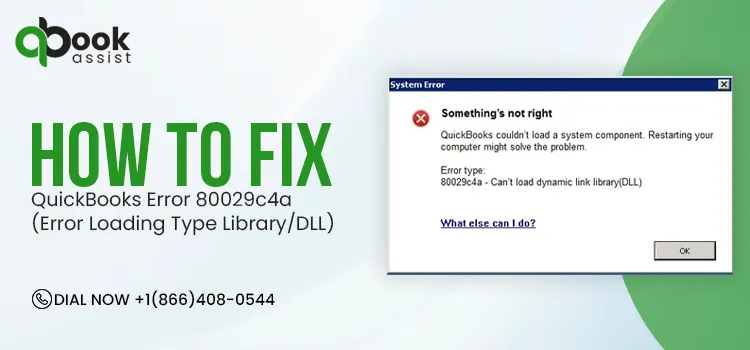
QuickBooks users encounter different issues while opening the QuickBooks Desktop software. One common issue is QuickBooks Error 80029c4a. This issue mainly arises when the software cannot load a specific Dynamic Link Library (DLL) or a system file. Common error messages that appear;
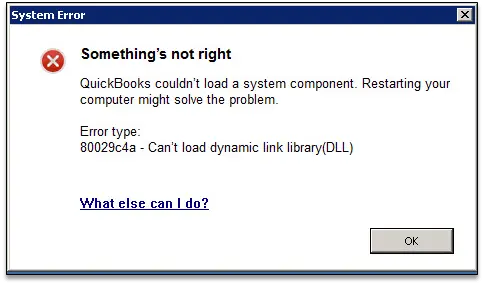
| Problem: There was an unexpected error reported while trying to run QuickBooks with company file “name of your company file: |
| Error Code: 80029c4a |
| Description: Error Loading type library/DLL |
It is mainly caused when antivirus software identifies QuickBooks files as a threat. Another factor causing this issue is corrupted QuickBooks installation files.
This guide explains the causes, symptoms, and proven troubleshooting methods to resolve QuickBooks system error 80029c4a.
What is QuickBooks Error 80029c4a?
QuickBooks Error 80029c4a is a DLL-related error that occurs when QuickBooks Desktop cannot load a required system file or component. It commonly appears with the message “Error Loading Type Library/DLL” and is usually caused by corrupted program files, antivirus interference, or an incomplete QuickBooks installation.
What Happens When You Notice Error Code 80029c4a in QuickBooks Desktop?
Users may notice the following symptoms upon the arrival of Error Code 80029c4a in QuickBooks Desktop.
- QuickBooks Desktop crashing during startup.
- You will receive the QuickBooks error message 80029c4a stating “Error loading type library/DLL” when opening QuickBooks.
- QuickBooks becomes unresponsive or freezes.
- Another error message that you notice is “Error type: 80029c4a – Can’t load dynamic link library (DLL).”
- QuickBooks fails to load necessary DLL or type library files.
- QuickBooks company file becomes inaccessible.
Causes Behind QuickBooks Error Code 80029c4a
Understanding the root causes behind the QuickBooks Error Code 80029c4a is equally important as the troubleshooting. This will help in finding the right solution according to the cause of the error. Here’s the list of causes that trigger this issue.
- Missing or incorrect installation of QuickBooks software.
- Your QuickBooks Desktop files are damaged, corrupt, or missing.
- Corrupted Windows registry files.
- This issue may occur if the company file is corrupt or is unable to be located when users try to open the software.
- If the QuickBooks components fails to start properly, or required DLL files are missing or corrupted.
- You haven’t included QuickBooks executable files in the Windows Firewall or antivirus software safe list.
How to Fix QuickBooks Error 80029c4a when opening QuickBooks Desktop?
After understanding the causes, let’s apply the tried and tested solutions to fix the QuickBooks Desktop Error 80029c4a.
Method 1: Update QuickBooks Desktop
If you are getting QuickBooks Desktop error 80029c4a when opening QuickBooks Desktop, update it to the latest release. Here’s what you need to do:
- Move to the File menu at the top and click Close Company/Off.
- After this, go back to the File menu and select Exit.
- Right-click on the QuickBooks Desktop icon and hit Run as Administrator.
- Choose Update QuickBooks from the Help menu when on the No Company Open screen.
- In the Options tab, select Mark All and then Save.
- Tick the Reset Update checkbox and click the Get Updates button.
- Once the Update Complete message pops up, select Yes.
- After completing the installation, restart your computer.
Method 2: Check your antivirus software
At times, the antivirus software stops QuickBooks from loading essential files for security reasons. So, to fix the issue, check the areas of your program that list blocked files. Refer to your antivirus program for setting up permissions.
If you notice any of the programs listed below in your quarantine, give them permission to go through your firewall.
| AutoBackupExe.exe Dbmlsync.exe DBManagerExe.exe FileManagement.exe FileMovementExe.exe QuickBooksMessaging.exe QBW32.exe QBDBMgrN.exe | QBGDSPlugin.exe QBServerUtilityMgr.exe QBCFMonitorService.exe QBLaunch.exe QBUpdate.exe IntuitSyncManager.exe OnlineBackup.exe |
Important Point: You will get most of these files in C:\Program Files\Intuit\QuickBooks (year). Whereas the files with (x86) are located in the location, like C:\Program Files (x86)\Intuit\QuickBooks 20XX, are 64-bit versions.
Method 3: Use QuickBooks Tool Hub to repair QuickBooks
Take the help of the QuickBooks Tool Hub to repair the damaged QuickBooks Desktop and then update the software. This ensures that you have the most recent fixes and security updates.
Important Point: If you have multiple versions of QuickBooks Desktop on your computer, then uninstall the ones that are not in use any more.
Run Quick Fix My Program
- Ensure you have downloaded and installed the latest version of QuickBooks Tool Hub.
- Open Tool Hub and click Program Problems.
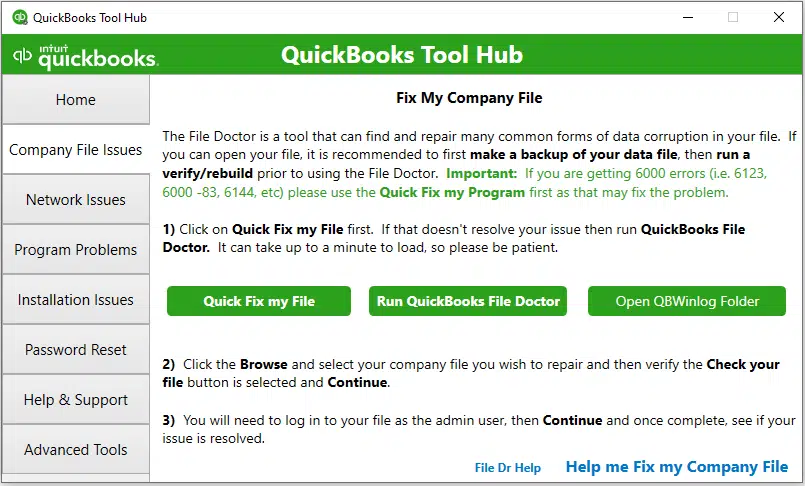
- Move to the Quick Fix My Program option.
- Now, start QuickBooks Desktop and then launch your company file.
Run QuickBooks Install Diagnostic Tool
If there is any problem while installing QuickBooks, you can fix it by running the QuickBooks Install Diagnostic tool.
- Launch the QuickBooks Tool Hub.
- Go to the Installation Issues tab.
- Now, click the QuickBooks Install Diagnostic tool. Allow the tool to repair the damage during the installation.
- Relaunch your PC after completing the process.
- Open QuickBooks Desktop and then access your company file.
- Update your QuickBooks Desktop to the latest version and see if the error still continues.
Method 4: Reinstall QuickBooks Desktop
Reinstalling QuickBooks Desktop will automatically refresh the program files that are causing Error 80029c4a.
- Remove QuickBooks Desktop if it’s already installed.
- Open the Start menu and then launch File Explorer.
- Move to the folder that contains your QuickBooks company file and open it. You will usually find your file in these QuickBooks folders.
- C:\ProgramData\Intuit\QuickBooks (year)
- C:\Users\(current user)\AppData\Local\Intuit\QuickBooks (year)
- C:\Program Files\Intuit\QuickBooks (year)
- 64-bit version C:\Program Files (x86)\Intuit\QuickBooks (year)
- Right-click the folder and select Rename.
- Add the word “old” at the end of the folder name. This prevents QuickBooks from opening it when you reinstall.
- Reinstall QuickBooks Desktop.
If you receive an error message when you try to rename the folder.
- Go to Windows Task Manager, right-click on it and select Task Manager.
- Choose the Processes tab.
- Pick the Name column header to sort the list.
- After that, choose the following processes and click End Process for each: QBDBMgrN.exe, QBDBMgr.exe, QBCFMonitorService.exe, Qbw32.exe.
- Now, if you get the message, “WARNING: Terminating a process can cause undesired results…”, then click Yes.
Method 5: Perform a Windows Repair on QuickBooks
- Click Start menu and select Control Panel.
- If you are running Windows 8 or 8.1, search the Control Panel in the Windows Start menu.
- Choose Programs and Features, then click Uninstall a Program.
- Important Point: If you can’t see Programs and Features, click Programs instead. Then, hit Programs and Features.
- Move to QuickBooks from the list of Programs, and click Uninstall/Change.
- Tap on Continue or Next.
- Click Repair, then Next option.
- Wait until the repair is over, and once it’s over, select Finish.
Method 6: Run the Reboot.bat Utility
If the issue is still not fixed, then restart and register QuickBooks services & DLL’s using the Reboot.bat command. To do so, use the following steps.
- Shut down QuickBooks Desktop.
- Launch the QuickBooks folder containing the reboot.bat file.
- Right-click on the QuickBooks Desktop icon and select Properties.
- Choose the Open file location.
- Right-click the reboot.bat file and select Run as Administrator.
- A Command (DOS) prompt window will appear with rapidly scrolling file names.
- Make sure not to shut down the window manually, as it will close automatically when the reboot.bat re-registers the file.
- At last, restart your computer.
Method 7: Run Windows System File Checker
You can fix the corrupted Windows system files by running Windows System File Checker tool and also fix DLL-related QuickBooks errors.
- Click on Start menu and type command in the text field.
- Press the Ctrl + Shift keys and hit the Enter key.
- A permission dialog box will appear on the screen, where you need to click Yes.
- Now, type “SFC/Scannow’ and press Enter key.
- Next, wait unless the tool repairs the scanning process.
- Once done, follow the on-screen prompts to complete the process.
Method 8: Update Antivirus Software
Outdated antivirus software can sometimes interfere with QuickBooks processes or fail to recognize legitimate program files. Updating your antivirus to the latest version helps improve system security and reduces the risk of compatibility issues with QuickBooks.
Steps to update your antivirus software:
- Open your antivirus program and check for available updates.
- Download and install the latest virus definitions and software updates.
- If you’re using Avast, right-click the Avast icon in the system tray, select Update, and follow the on-screen instructions.
- Restart your computer and launch QuickBooks to verify whether the issue has been resolved.
Final Thoughts
QuickBooks Error 80029c4a is typically caused by damaged DLL files, corrupted QuickBooks components, or antivirus interference. Updating QuickBooks, repairing the installation, checking quarantined files, and running QuickBooks Tool Hub you can help resolve the issue. If the error persists, performing a clean install of QuickBooks Desktop may be necessary.
Frequently Asked Questions
1. What does “Error loading type library/DLL” mean in QuickBooks?
This error message states that QuickBooks can’t access or load necessary DLL files due to damaged, missing, or blocked DLL files.
2. How can I prevent QuickBooks Error Code 80029c4a?
You can prevent the QuickBooks Error Code 80029c4a by keeping QuickBooks updated, updating antivirus software, and creating regular backups of company files.
3. What if QuickBooks couldn’t load a system component?
If QuickBooks couldn’t load a system component, the software starts crashing unexpectedly, failing to access the company file and to perform certain QuickBooks tasks.
4. Can damaged registry entries cause QuickBooks Error 80029c4a?
Yes, invalid or corrupt Windows registry entries linked with QuickBooks may interfere with the program and cause this issue.

Recent Posts
QuickBooks Payroll: Service, Setup, Pricing and Support Guide
Read MoreQuickBooks Error Support: Get Instant Help Via Live Chat or Call
Read MoreQuickBooks Error 3371 Explained: Common Causes and 7 Effective Fixes
Read MoreHow to Contact QuickBooks Customer Service and Talk to a Live Expert
Read MoreHow to Update QuickBooks Company File Without Losing Data?
Read More