Get Started with QuickBooks Payroll Setup For Easy Tax Filing
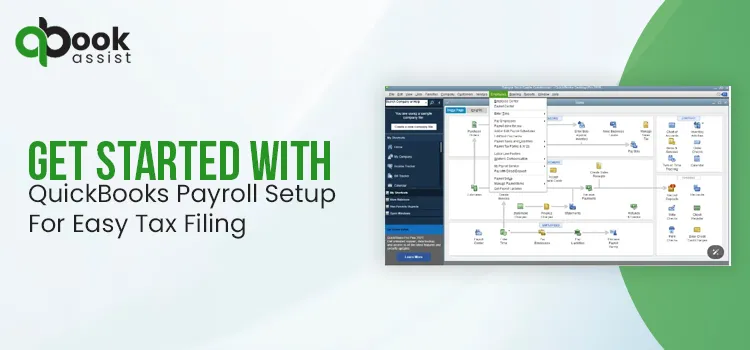
QuickBooks Payroll setup is a process to activate the service, which requires company and employee details, connecting your bank account, and configuring payroll tax preferences. Once payroll is set up, you can process employee payments accurately, handle taxes, and ensure timely payroll submissions.
If you are also looking for the detailed steps for QuickBooks Online payroll setup, read this guide. We have also covered the steps for payroll setup with QuickBooks Desktop.
Need QuickBooks payroll setup help to handle the payroll tasks? Contact our QB professional, and they will provide you with the best assistance.
How Do I Get Started With QuickBooks Online Payroll Setup?
Follow the steps below for the QuickBooks Online Payroll Setup.
Access the payroll setup:
- Log in to your account as a primary administrator.
- Move to All Apps > Payroll and click the Overview option.
If you are a QuickBooks Payroll Elite user, you can get help from any one of the experts to set up payroll. You can visit the Expert Setup section for placing a call or for scheduling an appointment.
- Cick on Get Started and choose whether you paid employees the following year.
- Pick the date from when you begin paying your employees via QuickBooks.
- Mention your main business address accurately.
- Provide a physical address (not a PO box). Your work location will identify your tax responsibilities.
- In case you have multiple work locations, include them at the time of adding your employees.
- Now, insert your main payroll contact details.
- Herein, add the details of the person liable for paying your employees. After adding the details, the payroll contact person will receive the notifications from QuickBooks. Then, the users can talk with the payroll experts regarding the payroll account.
- Afterwards, choose how you have run your payroll in the past.
- Depending on your reply, you can import employee and pay history details. You don’t have to enter such details manually.
- Herein, start adding your employees and tap on Add your team to get the details.
- In case you haven’t paid your employees in the current year, you can choose to pay them via paper check if necessary. Otherwise, you can skip the setup part and continue with the rest of the setup tasks.
Important Tip:
1. If you choose to pay the employees now, you will be liable for any payroll taxes due unless the payroll setup is done.
2. On the other hand, if you pay your employees in the current year, you need to perform more tasks before running the payroll.
Set Up Tasks
1. Add Your Team
For adding the employees, you must require the following information.
- A complete W-4 Form, or any other state equivalent forms, are applicable.
- Hiring date
- Birth Date
- Pay Date
- Bank account or pay card details for direct deposit
- Sick, vacation, or paid time off (PTO) accrual rates and balances.
- Any paycheck deduction, such as contributions to insurance, retirement, or wage garnishments.
2. Provide Your Tax Details
Within this task, you are required to include your federal, state, and local payroll tax details.
- Federal Employer Identification Number (EIN)
- State Withholding/unemployment account numbers.
- Local tax withholding account numbers (if applicable)
- Federal, state, or local tax deposit frequency: how often the IRS, state, or local tax agency informs you to pay your taxes.
- State tax rates: unemployment, surcharges, state disability, and paid family leave.
3. Connect Your Bank
You need to connect your payroll bank account with QuickBooks to access the direct deposit feature. Thus, it will allow you to pay and file payroll taxes accurately. For instant connection, you can use the direct deposit feature. The following are the details that you may require:
- Principal officer’s name, home address, Social Security Number, birth date, and authorized signer on payroll bank account.
- Business bank account online user ID and password. Otherwise, give the routing and account number for the account you have to use for direct deposit and payroll taxes.
Read More:- QuickBooks For Small Business
4. Include your Payroll History if you already paid employees this year.
Herein, provide the year-to-date paycheck details for each employee you have paid this year. This information will be helpful for reporting wages and taxes on the W-2 form and other payroll tax forms.
You may require the following information:
- Pay Stubs or payroll reports for each employee paid within this calendar year.
- Payroll reports with company totals of wages and taxes for each paycheck date in the current quarter.
5. Set Your Tax Preferences (if you haven’t paid any employees this year)
In this task, you have to notify how you wish to manage your payroll tax payments and filings. Below are a few options you can use to handle it.
- I want QuickBooks to automatically pay and file my taxes (this is the default).
- I’ll initiate payments and filings using QuickBooks (e-pay and e-file).
- I’ll pay and file the right agencies through their website or by mail (manual).
6. Tell us which taxes you’ve paid this year if you already paid employees.
You have to perform the following steps.
- Double-check the payroll taxes that you have previously paid this year. You can compute this detail from the pay history you added in QuickBooks.
- Now, you have to tell how you want QuickBooks to handle your taxes and forms.
- Have us pay and file automatically on your behalf.
- You can e-pay and file via QuickBooks.
- You pay and file to the agencies (manually)
- After this, your principal officer will electronically sign the authorization forms.
The following is the information that you require:
- Payroll tax liability reports, or receipts of tax payments you made this year.
- Allow the Principal Officer to answer the questions and electronically sign your forms.
7. Take Care of Your Team
Herein, you can find out workers’ comp policies, 401 (k) plans, or health plans. Intuit does the partnership with providers to provide you with excellent services so that they can integrate with payroll easily.
How to Setup Payroll in QuickBooks Desktop Easily?
Before paying employees, it’s essential to setup QuickBooks Desktop Payroll Enhanced.
First Step: Activate Your Payroll Subscription
After buying the QuickBooks Desktop Payroll Enhanced subscription, you must activate it. However, the steps may vary according to your purchase, whether it’s done online, by phone, or through a retail store.
Case 1: If purchased online or by phone
If you have bought the payroll online or by phone, you will get a 16-digit service key via email. All you need is to enter the key in QuickBooks to access the payroll features easily.
If you won’t get the service key, look into your junk or spam folder. Otherwise, you can also access the automated Service Key Retrieval tool. For that, you must log in to your Intuit Account.
- Firstly, launch the QuickBooks Desktop company file.
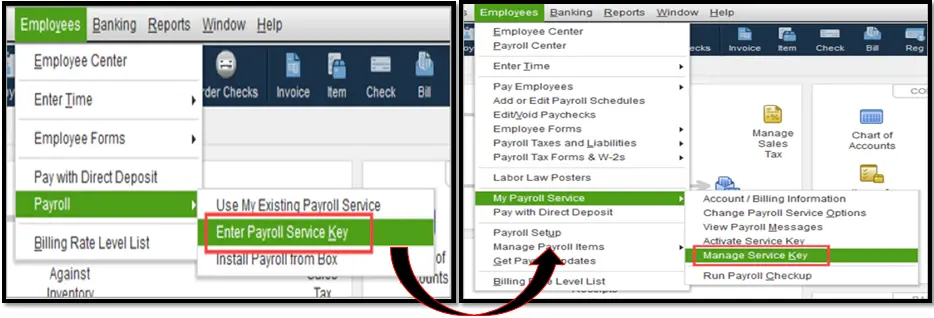
- Move to the Employees menu and click the Payroll option.
- After that, pick the Enter Payroll Service key option and select the Add option.
- Mention the service key and click Next > Finish.
- Finally, wait until the new tax table is downloaded accurately.
Case 2: If you buy from a retail store
- Initially, access your QuickBooks Desktop company file.
- Now, head to the Employees > Payroll > Install Payroll from Box option.
- You must provide the Payroll License and Product Information in the Payroll Activation page. All you require is to get your license and product details on a yellow sticker available on the CD folder inside the box.
- Choose the Continue option.
- Finally, do as per the instructions provided on the screen to complete the payroll activation.
Second Step: Accomplish Your Payroll Setup Tasks
In this step, add all your employees, set up federal and state payroll taxes, and then mention paychecks plus tax payments you already paid this year.
You have to wait, as it may take some time to get your payroll details into QuickBooks. Considering this, the setup is designed in such a manner that it lets you add details as per your preference and then save them.
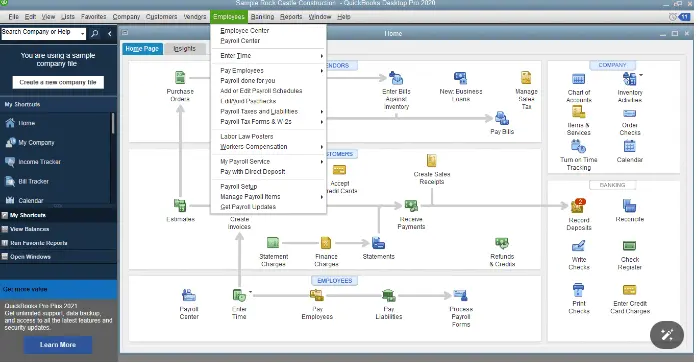
- Move to the Employees menu and click the Payroll Setup option.
- After this, use the on-screen instructions to add your employees, set up company payroll items, and taxes. Then, provide the pay history (if possible).
1. Add Employees
Herein, you must include your payroll details and then invite your employees to add some of their own details via QuickBooks Workforce if you are using QuickBooks Desktop Payroll Enhanced.
The following is the information that you require for each employee.
- A complete W-4 form and any state equivalent forms, if possible.
- Hire Date
- Pay Rate
- Sick, vacation, PTO accrual rates and balances
- Bank account or pay card details for direct deposit
- Paycheck deductions like contributions to insurance, wage garnishment, or retirement.
2. Set up company (pay items, deductions, PTO)
Herein, select from the given list of pay items, insurance benefits, and retirement deductions, or set up customer items. In case you provide employees paid vacation or sick time off, include those details also.
After setting up payroll items and time off, access the Assign to employees button. With this, you can apply the items to multiple employees at the same time.
3. Setup taxes
Herein, you must add your federal and state payroll tax details. The QuickBooks Desktop Payroll Enhanced users can set up their payroll taxes electronically.
The following is the information that you require:
- Federal and state deposit frequencies: it means how frequently you are required by the IRS and the state to pay your taxes.
- Federal Employer Identification Number (FEIN)
- State tax rates: Unemployment, surcharge, state disability, paid family leave, etc.
- State Withholding and/or Unemployment account number: You can connect with your state agencies to register.
4. Enter Pay History
When you have previously paid employees this year, you have to add those paychecks and any tax payments you have made. You will get all these details on your employees’ W-2s at the end of the year.
If you still haven’t paid your employees this year, you don’t need to complete the setup.
The following is the information you require:
- Tax liability reports, tax payment receipts, or statements
- Pay stubs or payroll reports for each employee paid this year.
5. Review and Finalize
Herein, if you have mentioned the pay history, you have to provide your federal and state filing details for the closed quarters. QuickBooks will check out all the pay history details and then identify the errors. As a result, it will ensure that tour employees’ W-2s are accurate at the end of the year.
The following are the details that you require:
- Provide the Quarterly and state payroll tax forms for closed quarters (941, State Unemployment Insurance, etc).
Final Thoughts!
So, here we conclude this post and hope that now you can easily perform the QuickBooks Payroll setup. Thus, it will help in managing your employees’ payroll easily to pay them accurately. If you need expert assistance with QuickBooks Payroll setup or troubleshooting, connect with Qbookassist payroll professionals today.
Frequently Asked Questions (FAQ’s):-
Question 1: How does payroll work with QuickBooks?
Ans. Once you run payroll with QuickBooks, you can give approval timesheets from hourly employees and generate payroll checks. Also, you can print paychecks with paystubs or pay employees via the direct deposit feature.
Question 2: What is the first step when setting up payroll in QuickBooks Desktop?
Ans. To set up payroll in QuickBooks Desktop, move to the Employees and then click the Payroll Setup option. After this, perform the on-screen instructions to add employees, set up payroll items, and then add pay history.
Question 3: How to set up QuickBooks for payroll?
Ans. To set up QuickBooks for payroll, go to the payroll option from the left menu. Choose your plan and pick the suitable plan for your business requirements. Provide the Business details and then your contact information.
Question 4: Does QuickBooks automatically do payroll?
Ans. QBO Payroll saves your precious time by automatically managing paychecks for salaried and hourly team members who work for a set number of hours.
Question 5: How to turn on payroll in QuickBooks?
Ans. To turn on payroll in QuickBooks, perform these steps:
- Firstly, move to the Settings menu and click Subscriptions and billing below the Your Company heading.
- Afterwards, head to the QuickBooks Payroll.
- Hit the Subscribe option, and if you don’t have a credit card on file, you will be asked to enter the Payment details.

Recent Posts
Why is My QuickBooks Desktop Running Slow? Here’s How to Fix
Read MoreHow to Get in Touch with QuickBooks Live Bookkeepers? Easy Guide
Read MoreHow To Fix QuickBooks Multi-User Mode Problems: H202?
Read MoreRun QuickBooks For Small Business & Simplify Your Finances
Read MoreEasy Steps to Download QuickBooks Tool Hub (1.6.0.8) For Free
Read More