QuickBooks Online Test Drive — Explore a Free Sample Company Without Any Risk

What if you could explore QuickBooks Online fully — without entering your credit card, without risking your real business data, and without being locked into a subscription you are not ready for?
That is exactly what the QuickBooks Online Test Drive gives you. It is a free, no-login, no-commitment sandbox environment loaded with a pre filled sample company. You get to click through every feature, run reports, create invoices, and explore the dashboard — all in a live environment with zero consequences.
At QBookAssist, our QuickBooks support services team guides hundreds of small business owners and accountants through QuickBooks every month. And this test drive is always the first thing we recommend before anyone spends a dollar on a subscription. Here is everything you need to know.
What Is the QuickBooks Online Test Drive?
The QuickBooks Online Test Drive is a free sample company environment provided by Intuit that lets you use a fully functional version of QuickBooks Online — without creating an account, without a credit card, and without touching your actual business data.
Think of it as a flight simulator for pilots. Everything looks and works exactly like the real thing. But nothing you do inside affects any real aircraft.
Inside the QBO test drive you get:
- A pre-loaded sample company called Craig’s Design and Landscaping Services
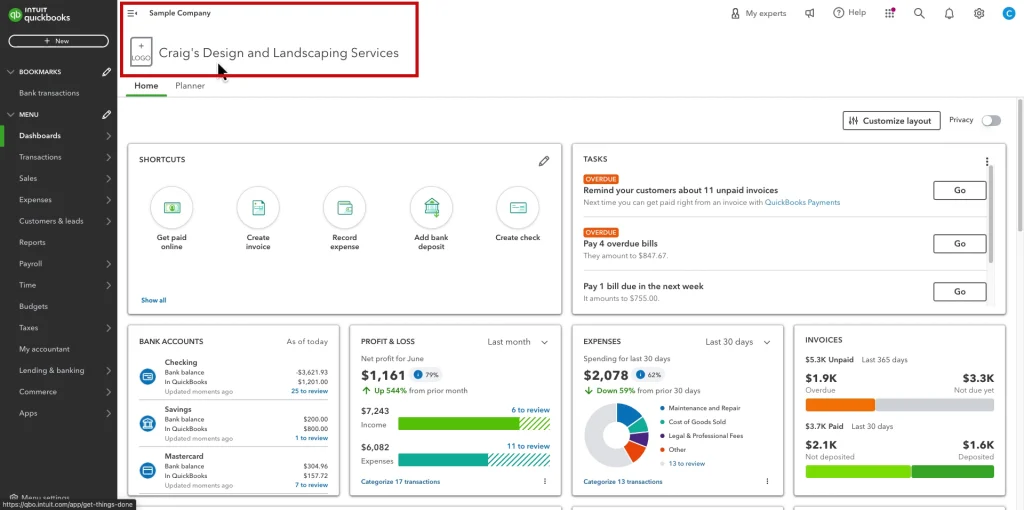
- Real transactions, invoices, expenses, payroll entries, and bank feeds already filled in
- Full access to the QuickBooks Online Plus feature set
- The ability to create, edit, and delete records freely
- A completely reset environment — every time you log out and come back, the sample data is restored fresh
This is not a watered-down demo. It is the real QuickBooks Online interface with real data to explore.
Why Most Business Owners Get This Wrong
Here is something nobody tells you upfront.
Intuit’s standard free trial requires you to enter your credit card details. The moment your trial ends — whether you realized it or not — your subscription starts billing automatically. Many small business owners have called us after being charged for a plan they never intended to
activate.
That is the subscription trap of traditional software trials.
The second problem is even more serious. Some business owners skip the trial entirely and start entering real company data into QuickBooks immediately — without fully understanding how the software works. This leads to:
- Wrongly categorized transactions that corrupt your books
- Duplicate entries that take hours to clean up
- Permanent errors in payroll or tax settings that require professional recovery
- Data that cannot be easily undone once saved
The QuickBooks Online Test Drive solves both problems completely. No card. No subscription. No real data at risk.
QBookAssist Tip: We always tell our clients — spend at least 2 hours in the test drive before touching your real company file. Those 2 hours can save you from 20 hours of data cleanup later.
How to Access the QuickBooks Online Test Drive
No requirement login, account and credit card. Here is how to get in right now.
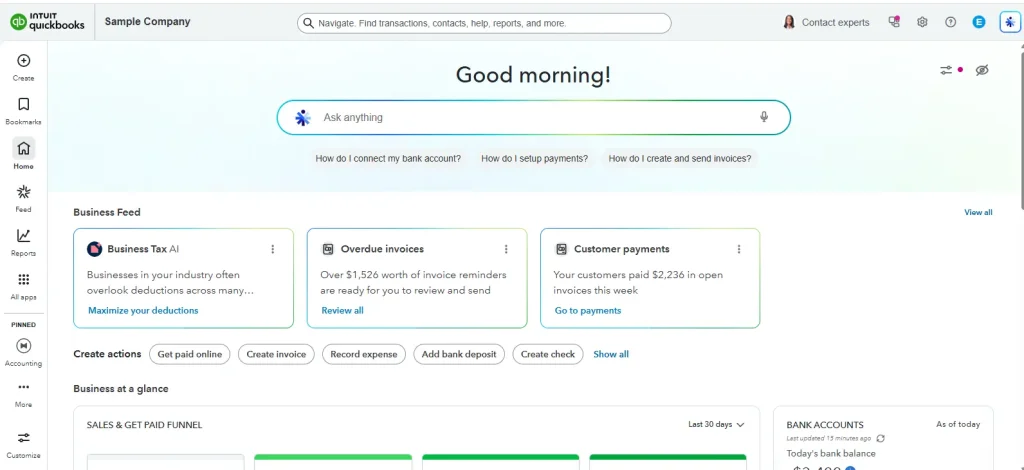
Step 1: Open the Test Drive Link Directly
The QuickBooks Online Test Drive USA version is accessible at Intuit’s official link. Simply open your browser and search for “QuickBooks Online test drive” — the official Intuit page will appear at the top. Click the link and you are inside instantly.
You do not need to create a QuickBooks account. You do not need to verify your email. The sample company loads directly in your browser.
Pro Tip: Use Google Chrome or Microsoft Edge for the best experience. Some features in the QBO test drive may not render correctly in older browsers like Internet Explorer.
Step 2: Complete the CAPTCHA Verification
The only step between you and the sample company is a simple CAPTCHA check — this confirms you are a real person and not an automated bot. Click the checkbox, complete the verification if prompted, and the QuickBooks Online sample company dashboard opens immediately.
No personal information required. email address and phone number.
Step 3: Start Exploring the Sample Company
You are now inside Craig’s Design and Landscaping Services — a fictional but fully realistic small business. The sample company is pre-loaded with:
- Customer invoices and payments
- Vendor bills and expenses
- Bank and credit card transactions
- Payroll records
- Profit and Loss reports
- Balance Sheet and Cash Flow statements
- Chart of Accounts
- Inventory items and estimates
Everything a real small business would have in QuickBooks Online is already here. You can click on anything, edit anything, run any report, and explore any feature — completely freely
What Can You Do Inside the QuickBooks Online Test Drive?
Most people do not realize how much the QBO test drive actually lets you explore. Here is what you can practice:
Create and Send Invoices
Go to Sales > Invoices > New Invoice. You can create a real invoice, add line items, apply taxes, attach files, and preview how it looks to customers. This is the most important workflow for service-based businesses — and the test drive lets you practice it completely.
Run Financial Reports
Go to Reports in the left menu. Every report QuickBooks Online offers is available:
- Profit and Loss
- Balance Sheet
- Cash Flow Statement
- Accounts Receivable Aging
- Sales by Customer
- Expense by Vendor
- Tax Summary
Run each one, change the date ranges, and see how your real business data would look once you start using QuickBooks.
Explore the Chart of Accounts
Go to Accounting > Chart of Accounts. This is where most new users make permanent mistakes in their real company file — creating duplicate accounts or wrong account types. The test drive lets you practice editing, adding, and organizing accounts without any consequences.
Record Expenses and Bills
Go to Expenses > New Expense. Practice adding vendor bills, receipts, and expense categories. Understanding how expenses flow into your Profit and Loss report is critical before you start with real data.
Pro Tip: Pay close attention to the difference between Expense and Bill in QuickBooks. An expense is paid immediately. A bill is something you owe but haven’t paid yet. Getting this wrong in your real company file causes account balance errors that are hard to fix.
QuickBooks Online Test Drive — USA vs Canada Version
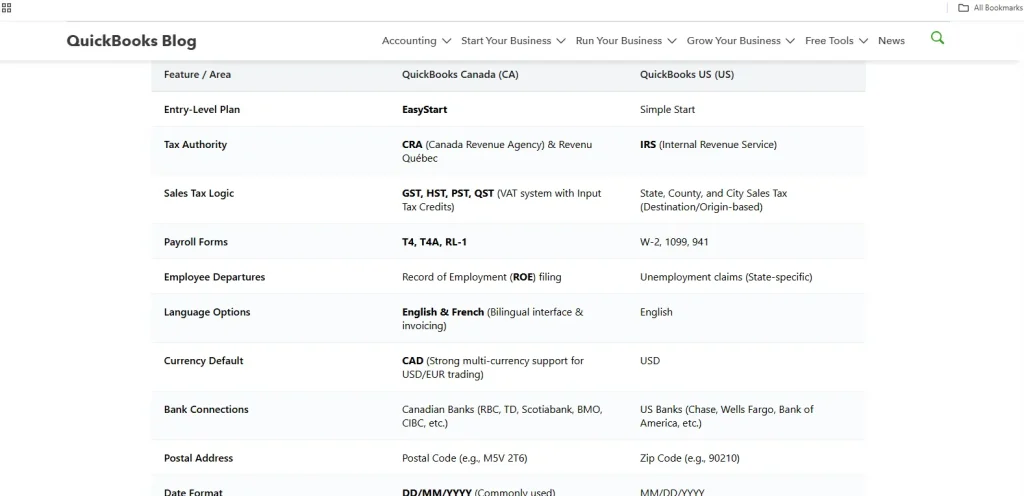
| Feature | QuickBooks Online Test Drive USA | QuickBooks Online Test Drive Canada |
| Currency | USD | CAD |
| Tax Setup | US Sales Tax | Canadian GST/HST/PST |
| Payroll | US payroll structure | Canadian payroll structure |
| Date Format | MM/DD/YYYY | DD/MM/YYYY |
| Sample Company | Craig’s Design & Landscaping | Same company, localized data |
| Access Method | No login required | No login required |
Both versions are completely free and require no account creation. If you are a Canadian business owner or accountant, search specifically for “QuickBooks Online test drive Canada” to get the correct regional version with Canadian tax settings pre-configured.
QuickBooks Online Test Drive vs Free Trial — What Is the Difference?
| Feature | QBO Test Drive | QBO Free Trial |
| Login required | ❌ No | ✅ Yes |
| Credit card required | ❌ No | ✅ Yes (auto-charges after trial) |
| Your own data | ❌ No (sample only) | ✅ Yes |
| Risk of being charged | ❌ Zero | ✅ Yes if you forget to cancel |
| Time limit | ❌ No limit | ✅ 30 days |
| Best for | Learning the software | Testing with your real data |
| Resets after logout | ✅ Yes | ❌ No |
Our recommendation at QBookAssist:
Start with the test drive to learn the software. Once you are confident, start the free trial — but set a calendar reminder for Day 25 to either subscribe or cancel before you are charged.
Once you are ready to subscribe, compare the official QuickBooks Online pricing plans to find the right tier for your business.
Who Should Use the QuickBooks Online Test Drive?
- Small business owners who want to see if QuickBooks Online fits their workflow before committing to a monthly plan.
- Accountants and bookkeepers who are onboarding a new client onto QuickBooks Online and want to map out their workflow before touching the client’s live file.
- Businesses migrating from QuickBooks Desktop to Online who want to understand how the Online interface works before making the switch — because the two versions look and feel very different.
- Students and trainees learning QuickBooks for certification or job preparation — the test drive is a completely safe environment to practice.
- Existing QuickBooks users who want to test a new feature — like a new report type or QuickBooks payroll setup — without experimenting on their live company file.
When You Need More Than a Test Drive
The QuickBooks Online Test Drive is excellent for learning. But there are situations where you need professional support — not a sandbox.
Call a QuickBooks specialist if:
- You are migrating from QuickBooks Desktop to Online and want to ensure zero data loss during the transition
- You have already made errors in your live company file and need them corrected before your accountant or tax deadline
- You want a done correctly from day one — chart of accounts, tax settings, payroll, and bank connections configured properly
- You are an accountant managing multiple client files and need a system built for your practice
This is where QBookAssist comes in. Our certified QuickBooks specialists handle everything from initial setup to error recovery — so you never have to guess whether something is configured correctly. Call us at +1-866-408-0544 for a free consultation.
Conclusion
The QuickBooks Online Test Drive is one of the most underused tools Intuit offers — and one of the most valuable. It gives you a completely free, no-risk environment to explore the full power of QuickBooks Online before you commit a single dollar or enter a single real transaction.
Use it to learn the software, practice your workflows, and build confidence. Then when you are ready to go live — make sure your setup is done right from the start.
Have questions about QuickBooks Online or need help with your setup? Call QBookAssist at +1-866-408-0544 — our team is available to help you get started the right way.
Frequently Asked Questions
Q1: Is the QuickBooks Online Test Drive really free?
Ans. Yes — completely free. No credit card, no account, no email address required. You access it directly through Intuit’s official website and the sample company loads instantly in your browser. There is no time limit on the test drive either.
Q2: Does the QuickBooks Online Test Drive save my changes?
Ans. No — and that is the point. Every time you log out and return to the test drive, the sample company resets to its original state. This means you can practice, make mistakes, and experiment freely without any permanent consequences.
Q3: What is the difference between the QuickBooks Online Test Drive and the free trial?
Ans. The test drive uses a pre-loaded sample company with no login or credit card required. The free trial lets you use QuickBooks with your own data but requires account creation and credit card details, and auto-charges after 30 days if not cancelled.
Q5: Is there a QuickBooks Online Test Drive for Canada?
Ans. Yes. Intuit offers a Canada-specific version of the test drive with Canadian tax settings (GST/HST/PST), CAD currency, and Canadian payroll structure pre-configured. Search for “QuickBooks Online test drive Canada” to access the correct regional version.
Q6: Can I practice payroll in the QuickBooks Online Test Drive?
Ans. Yes. The sample company includes payroll data you can explore and edit. However, you cannot process actual payroll runs in the test drive. It is best used to understand the payroll interface and setup before working on a live company file.
Q7: What version of QuickBooks Online does the test drive use?
Ans. The QuickBooks Online Test Drive sample company uses the QuickBooks Online Plus feature set — which includes inventory tracking, project profitability, and budgeting tools. Some features exclusive to Advanced or Simple Start may not be fully visible.

Recent Posts
Tried Everything? Here’s How to Fix QuickBooks Error Code 80070057
Read MoreQuickBooks Enterprise Online Support: Your Complete Help Guide
Read MoreIntuit QuickBooks Customer Service: How to Contact Support
Read MoreQuickBooks Payroll: Service, Setup, Pricing and Support Guide
Read MoreQuickBooks Error Support: Get Instant Help Via Live Chat or Call
Read More