QuickBooks File Doctor Tool: Fix Company File & Network Errors
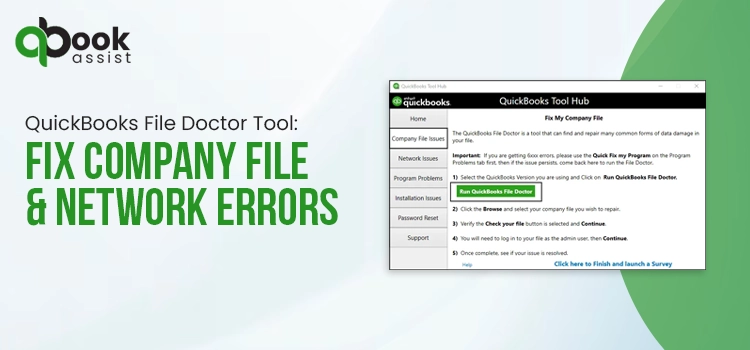
Managing business accounting data securely while ensuring uninterrupted operations is essential for every QuickBooks Desktop user. However, issues such as QuickBooks company file errors, damaged QBW files, QuickBooks crashing while opening files, or missing customer, vendor, or employee lists can affect your workflow and impact productivity. To deal with these issues efficiently, Intuit introduced the QuickBooks File Doctor Tool, a powerful utility designed to diagnose and repair damaged QuickBooks company files and network-related problems.

Whether you need help with QuickBooks file repair, fixing QuickBooks Error 6000, fixing multi-user mode issues, or resolving QuickBooks company file errors, this comprehensive guide covers everything you need to know about downloading, installing, and running the QuickBooks File Doctor Tool.
What is the QuickBooks File Doctor Tool?
The QuickBooks File Doctor tool is a built-in diagnostic and repair utility included in the QuickBooks Tool Hub. It helps users repair damaged company files, fix QuickBooks Error 6000 series issues, resolve network connectivity and multi-user problems in QuickBooks Desktop.
Before September 2020, you could download this utility separately, known as a stand-alone version. But now you need to download and install Tool Hub to use the File Doctor tool. After that, you can use this tool to fix connectivity errors when opening QuickBooks over a network like H101, H202, H303, or H505.
Common Errors Fixed by QuickBooks Desktop File Doctor
The QuickBooks File Doctor Tool can diagnose & repair several QuickBooks company file errors, network connectivity issues, and multi-user mode problems. Below are the most common errors fixed by QuickBooks Desktop File Doctor. You can fix the following errors by running the QuickBooks Tool Hub File Doctor.
| Error Code / Issue | Description |
|---|---|
| H202 Error | Occurs when QuickBooks cannot connect to the company file stored on another computer or server in multi-user mode. |
| H505 Error | Indicates that additional configuration is required for hosting multi-user company files. |
| 6000 Series Errors | Includes errors like -6000, -301, -6150, and -6147 caused by damaged company files or improper network setup. |
| Company File Damage | Detects and repairs corrupted or inaccessible QuickBooks company files (.QBW). |
| Network Connectivity Issues | Fixes communication problems between QuickBooks workstations and the server. |
| Multi-User Mode Problems | Resolves issues that prevent users from accessing QuickBooks in multi-user mode. |
| Data Corruption Errors | Identifies data integrity issues that may cause QuickBooks crashes or freezing. |
| Error 6150 | Appears when QuickBooks cannot open or create a company file due to file corruption. |
| Error 6147 | Happens when the company file path is incorrect or the file is damaged. |
| QuickBooks Freezing or Crashing | Helps repair damaged files that cause QuickBooks to stop responding unexpectedly. |
Fix Company File and Network Connectivity Issues in QuickBooks
In this blog section, we have discussed how you can download the QuickBooks File Doctor tool and troubleshoot company file corruption or network connectivity issues effeciently.
A. Download & Install QuickBooks Tool Hub
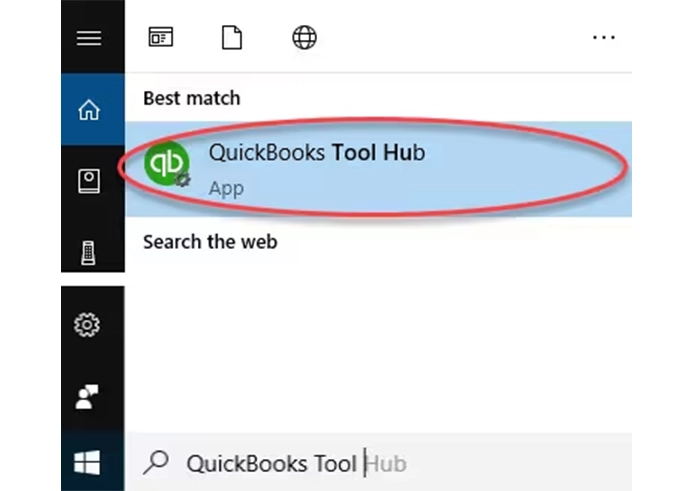
The QuickBooks Tool Hub is a one-stop solution that provides numerous tools, such as File Doctor, Install Diagnostic, Quick Fix My Program, etc., to fix the common accounting issues. However, to use the QuickBooks File Doctor Tool, first download and install the latest version of QuickBooks Tool Hub. The File Doctor utility is included inside Tool Hub and helps repair damaged QBW files, QuickBooks Error 6000 issues, and network connectivity problems.
B. Run Quick Fix My File
By running the Quick Fix My file tool, you can get a better experience of using File Doctor, which helps in fixing company files and network issues. Perform these steps to run this tool.
- Open the QuickBooks Tool Hub and click Company File Issues.
- Navigate to the Quick Fix My File.
- When done, hit OK and then open QuickBooks.
C. Run QuickBooks File Doctor Tool
- Launch QuickBooks Tool Hub and click Company File Issues.
- Choose Run QuickBooks File Doctor. The utility will take around one minute to open.
- Note: If you can’t open the File Doctor tool, locate QuickBooks Desktop File Doc and then open it manually.
- In QB File Doctor, pick your company file from the drop-down menu. If you can’t see your file, click Browse, and then locate your file.
- Move to Check your file (middle option only) and hit Continue.
- Enter your QuickBooks admin password and select Next.
The scan time of QB Tool Hub File Doctor depends on the size of your company file, and the level of file corruption. In some cases, the scan may display an unsuccessful result even after repairing the issue successfully. When the scanning is complete, open QuickBooks and your data file.
Troubleshoot Network Issues with QuickBooks File Doctor Test Results
The File Doctor Tool QuickBooks is used to recover your damaged company files and help fix some of your network issues. You can check the results you get by running this tool to see how to rectify the issue.
Here, we have discussed different sections of each test result and how to fix issues in each specific area.
1. Hosting mode is off
It is important to turn on the hosting to use the QuickBooks files over the network. Follow these steps to turn on hosting.
- Open QuickBooks on your server computer.
- Click the File menu and choose Switch to multi-user mode to turn on hosting.
Now, verify each of your workstations and resume with the above steps:
- Open QuickBooks on your server computer.
- Select the File menu from the top menu bar.
- If you see the Switch to single-user mode option, avoid selecting it.
- Browse to the next workstation, and if the option is Switch to multi-user mode, click it.
2. The folder containing the file is not writable or is not shared
Make sure that the folder containing the data file is shared with other users.
A. Setting up the folder permissions
Verify that the QuickBooks file folder permissions are accurate to ensure that the data file is shared on a multi-user network.
- Open the Start menu on your computer and locate the QuickBooks company file folder.
- Right-click on the company file folder and tap on Properties.
- Select the Advanced option from the Security tab.
- Choose the QBDataServiceUserXX and click Edit.
- Now, make sure that you set the following settings to Allowed.
- Transverse Folder/Execute File
- List Folder/Read Data
- Read Attributes
- Read Extended Attributes
- Create Files/Write Data
- Create Folders/Append Data
- Write Attributes
- Write Extended Attributes
- Read Permissions
If the permissions aren’t set properly;
- Search for the QuickBooks company file folder, right-click on it, and choose Properties.
- Hit the Security and then Edit menu.
- Move to the QBDataServiceUserXX and click Full Control, Allow.
- When done, pick Apply and then OK.
Change folder permissions
Use the following steps to adjust file folder permissions.
- Launch the Start menu and locate File Explorer.
- Press Enter to open it.
- Locate the company file folder below and right-click on each of them;
- C:\Program Data\Intuit\Entitlement Client\v8
- C:\Program Data\Intuit\Entitlement Client\v6.0
- C:\Program Data\Intuit\Entitlement Client\v5
- C:\Program Data\Intuit\Entitlement Client\v3
- C:\Program Data\Intuit\Entitlement Client
- C:\Program Data\Intuit\QuickBooks Enterprise Solutions X.0 (X = version) or C:\Program Data\Intuit\QuickBooks 20XX (XX = year)
- C:\Program Data\COMMON FILES\INTUIT
- C:\Program Data\COMMON FILES\INTUIT\QUICKBOOKS
- C:\Users\Public\Public Documents\Intuit\QuickBooks\FAMXX (XX = year)
- C:\Users\Public\Public Documents\Intuit\QuickBooks\Company Files
- C:\Users\Public\Public Documents\Intuit\QuickBooks\Sample Company Files\QuickBooks Enterprise Solutions X.0 (X = version) or C:\Users\Public\Public Documents\Intuit\QuickBooks\Sample Company Files\QuickBooks 20XX (XX = year)
Use these steps for any folder listed below. Remember that you don’t have all of these folders. A few of them are specific to certain QB Desktop versions.
- Right-click on the folder and select Properties.
- On the Security tab, click Everyone.
- Note: If Everyone is not listed in the Group or User Name checkbox, click Add and insert Everyone. Then, hit the OK option.
- Next, hit the Full Control option, click Apply > OK.
Set Windows access permissions to share company files
Ensure that QuickBooks has proper access that can help avoid future issues while working with company files over the network.
Windows 10
- Click the Start menu and open File Explorer.
- Search and right-click on the QuickBooks company file folder.
- Choose Properties > Sharing > Share Add option.
- Now, pick the corresponding QBDataServiceUserXX for your version.
- Make sure that the permission level of both users is set to Full Control, and choose Share.
3. No network connectivity
Make sure that you have at least one working TCP/IP adapter and that the hostname of the local machine is resolvable.
4. Run IPConfig
The IPConfig tool is used to check the TCP/IP configuration of your computer. This is mainly used to fix problems faced while accessing QB on a network.
The following are the most common IPConfig commands:
| Command | Description |
| ipconfig | Basic TCP/IP information |
| ipconfig/all | Detailed TCP/IP information |
| ipconfig/renew | Renew the IPv4 address for all network adapters |
| ipconfig/release | Release the IPv4 address for all network adapters |
Use the following steps to run ipconfig.
- Click the Start menu and type CMD in the search box.
- In the list of results, select Command Prompt.
- At the Command Prompt window, type ipconfig and hit Enter.
To get any further details on IPConfig, type ipconfig/? At the command prompt or visit support.microsoft.com. Microsoft.com isn’t an Intuit website.
5. QBCFMonitorService/QBDBMgrN not running, or the firewall is blocking QuickBooks
Users may come across certain issues when the firewall blocks the internet access required to run certain QuickBooks programs or files. Therefore, updating the firewall to the latest release will help fix the issue. Otherwise, you have to configure exceptions and ports required for your firewall.
A. QBCFMonitor Service not running
- Change the settings of the firewall to open the 8019 port for the tool and the QuickBooks application on clients and the server.
- Make sure that the server has turned on hosting.
- Ping the server to test the network connectivity. Make sure that the ping succeeds from the client and the server.
B. QBDBMgrN not running
- Configure your firewall settings to launch the Dynamic database port for the QB Tool Hub File Doctor and all the QuickBooks applications. Make sure that you configure your firewall on all client computers and the server.
- Make sure that you have enabled hosting on the server.
- Also, ensure that you are able to ping the server both with IP and hostname on the server and all client computers.
C. [Firewall software] is active, and may be blocking QuickBooks
If you detect any third-party firewall, then you may find it listed here. You need to configure exceptions for your QuickBooks version.
Why is QuickBooks File Doctor Taking a Long time?
QuickBooks File Doctor usually takes around 10-30 minutes to scan and repair damaged QBW files. However, if the File Doctor is taking longer than expected, the issue may be linked with a large company file, severe file corruption, low system performance, or unstable network connection.
Ending Words
The QuickBooks File Doctor Tool is one of the most effective utilities for repairing damaged QBW files, fixing QuickBooks Error 6000 series issues, resolving multi-user mode problems, and troubleshooting QuickBooks company file errors. By downloading the latest QuickBooks Tool Hub and running File Doctor correctly, users can restore access to their accounting data quickly and securely.
Frequently Asked Questions
1. Why Should you Use QuickBooks Desktop File Doctor?
This tool is used to diagnose and repair common issues with the data file and network connections. Also, it is useful when QuickBooks fails to open, crashes, or shows error codes that block normal use.
2. Does Quick Fix My Program work with the QuickBooks File Doctor Tool?
Yes, you can run both Quick Fix My Program and the QuickBooks File Doctor tool as a troubleshooting suite. You can use both these tools together, but they are used for fixing different types of issues.
3. How long should QuickBooks Desktop File Doctor take?
The QuickBooks Desktop File Doctor tool may take around 10 to 15 minutes to finish scanning. However, the time may vary according to the company’s file size and the number of transactions it contains.
4. Does QB File Doctor work on Windows 10?
The QB File Doctor tool is supported by Windows 10 and Windows 11 systems. But you may need updated Windows components and admin permissions for uninterrupted performance.
5. Why is QuickBooks File Doctor not opening?
The File Doctor not opening issue may be caused by damaged Windows components, an outdated Tool Hub, or missing .NET Framework files, or insufficient admin permissions. Reinstalling the latest QuickBooks Tool Hub version and running it as Administrator often resolves the issue.

Recent Posts
Tried Everything? Here’s How to Fix QuickBooks Error Code 80070057
Read MoreQuickBooks Enterprise Online Support: Your Complete Help Guide
Read MoreIntuit QuickBooks Customer Service: How to Contact Support
Read MoreQuickBooks Payroll: Service, Setup, Pricing and Support Guide
Read MoreQuickBooks Error Support: Get Instant Help Via Live Chat or Call
Read More